Train Your AI Agent on Telegram History
Export your past Telegram chat logs and train your Vela AI support agent to resolve tickets using historical conversation data.
You can instantly train your Vela AI agent using past customer interactions on Telegram. By importing your historical chat logs, Vela learns your team's specific voice and solutions, allowing it to accurately deflect future tickets.
Follow these steps to export your Telegram history and sync it to your knowledge base:
-
Initiate the Export: Open your Telegram settings and select the option to export your chat history.
-
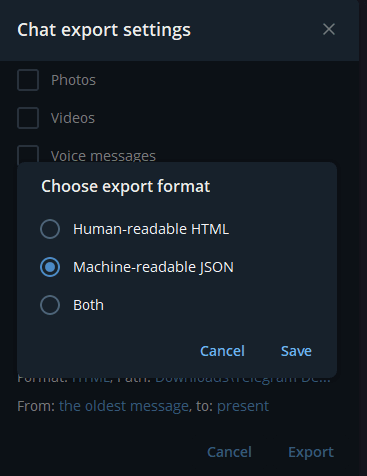
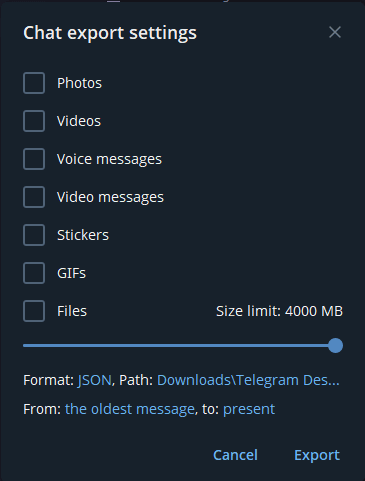
Select JSON Format: Choose the JSON format and select the specific date range you want to ingest.
-
Complete the Export: Click Export and wait for the download process to finish.
-
Upload to Vela: Open your Vela dashboard and upload the exported JSON file.
-
Review and Publish: Audit your imported conversations and replies. Edit them for accuracy, approve them, and add them directly to your agent's knowledge base. Your agent will instantly use these past interactions to automatically resolve future inquiries.